Your First Transaction in 20 Minutes (Keys, Wallets, and What 'Owning' Means)
The Radical Redefinition of Ownership in the Blockchain Era
1Your First Transaction in 20 Minutes (Keys, Wallets, and What “Owning” Means)
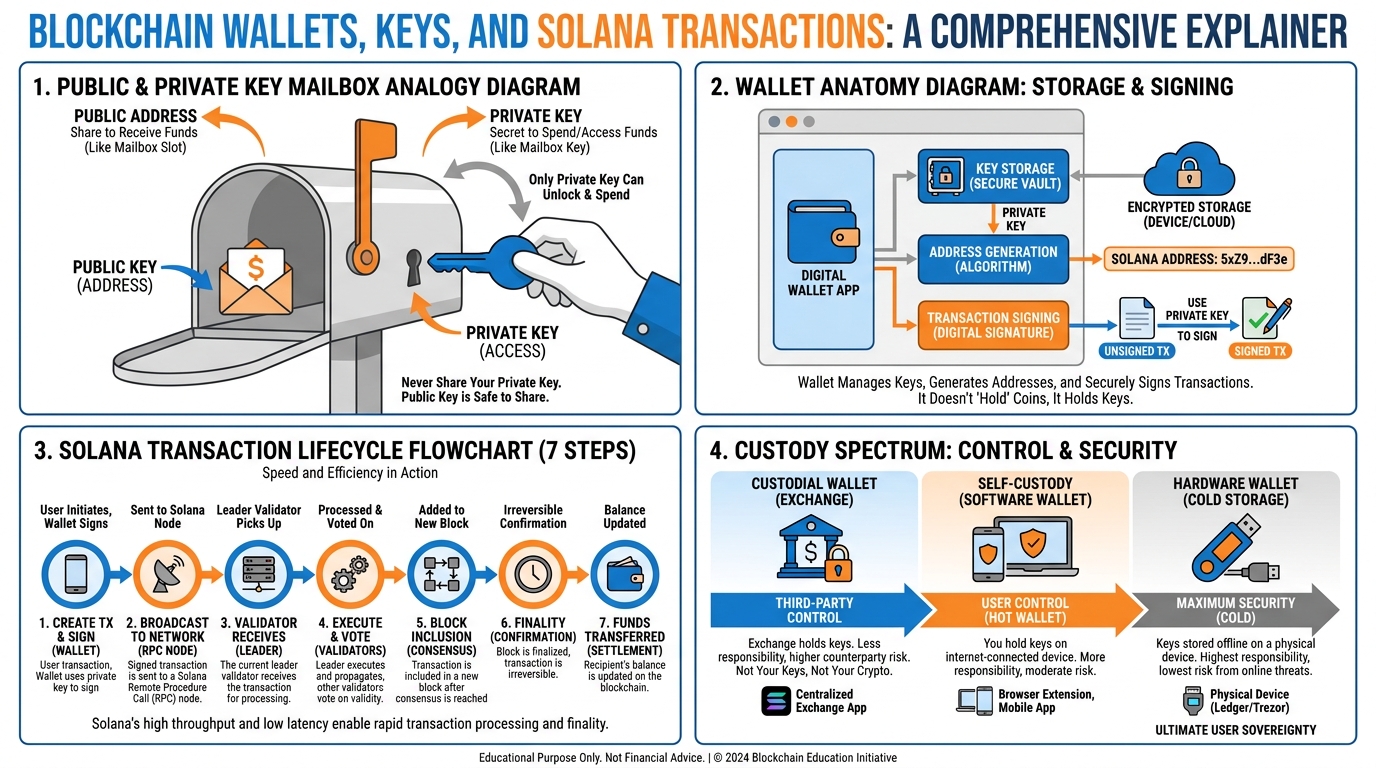
Figure 1:Chapter 1 Explainer Infographic: The complete map of ownership on Solana — from cryptographic key pairs to funded wallets to verified transactions on the block explorer.
You do not own the money in your bank account.
This is not a provocation. It is a legal fact. When you deposit money at a bank, you become an unsecured creditor of that institution. The bank records a liability to you — an obligation to return your funds on demand. That obligation is backed by regulatory requirements, deposit insurance (in the United States, up to $250,000 through the FDIC), and the bank’s solvency. When all of those mechanisms function correctly, the arrangement works. But you are not holding anything. You are holding a claim — a legal right to demand value from an institution that, in turn, holds assets of its own.
The same is true of your brokerage account. Of your PayPal balance. Of your airline miles. Of any digital asset held “on your behalf” by any institution. The institution controls the database. The institution decides when you can access it, how much you can withdraw, what identification you must provide, and — in extremis — whether to freeze, suspend, or seize your account.
Tonight — in approximately 20 minutes — you will own something in a fundamentally different sense. You will hold a cryptographic key to which no institution has access. The asset secured by that key cannot be frozen, seized, or denied to you by any bank, any government, or any company — because no bank, government, or company controls the record. The record is on a distributed ledger with tens of thousands of nodes, and only your private key can move what is behind it.
That is what self-custody means. And understanding it, at a technical level, changes how you think about property, about institutions, and about what it means to own something in the digital age.
1.1Why Ownership Is a Solved Problem — and Why It Isn’t
In the physical world, ownership is enforced by a combination of possession and legal recognition. You own your car because you possess it (or at least the keys to it) and because a government record — a title — records your name as the owner. If someone steals your car, the combination of physical evidence and legal record provides a mechanism for recovery. If someone falsifies the title record, the legal system provides (in theory) a remedy.
Digital ownership before blockchain was always a weakened form of ownership. You “owned” your music in your iTunes library — until Apple decided to change its licensing terms. You “owned” your virtual items in an online game — until the game was shut down. You “owned” your files in a cloud storage service — until the company was acquired, went bankrupt, or changed its terms. In each case, what you actually owned was a license or permission, contingent on the continued goodwill and solvency of a corporate platform.
Blockchain ownership is categorically different. On a blockchain, “owning” an asset means that a cryptographic private key you control can authorize the transfer of that asset. No institution intervenes. No permission is required. No account can be frozen. The protocol enforces the property right directly.
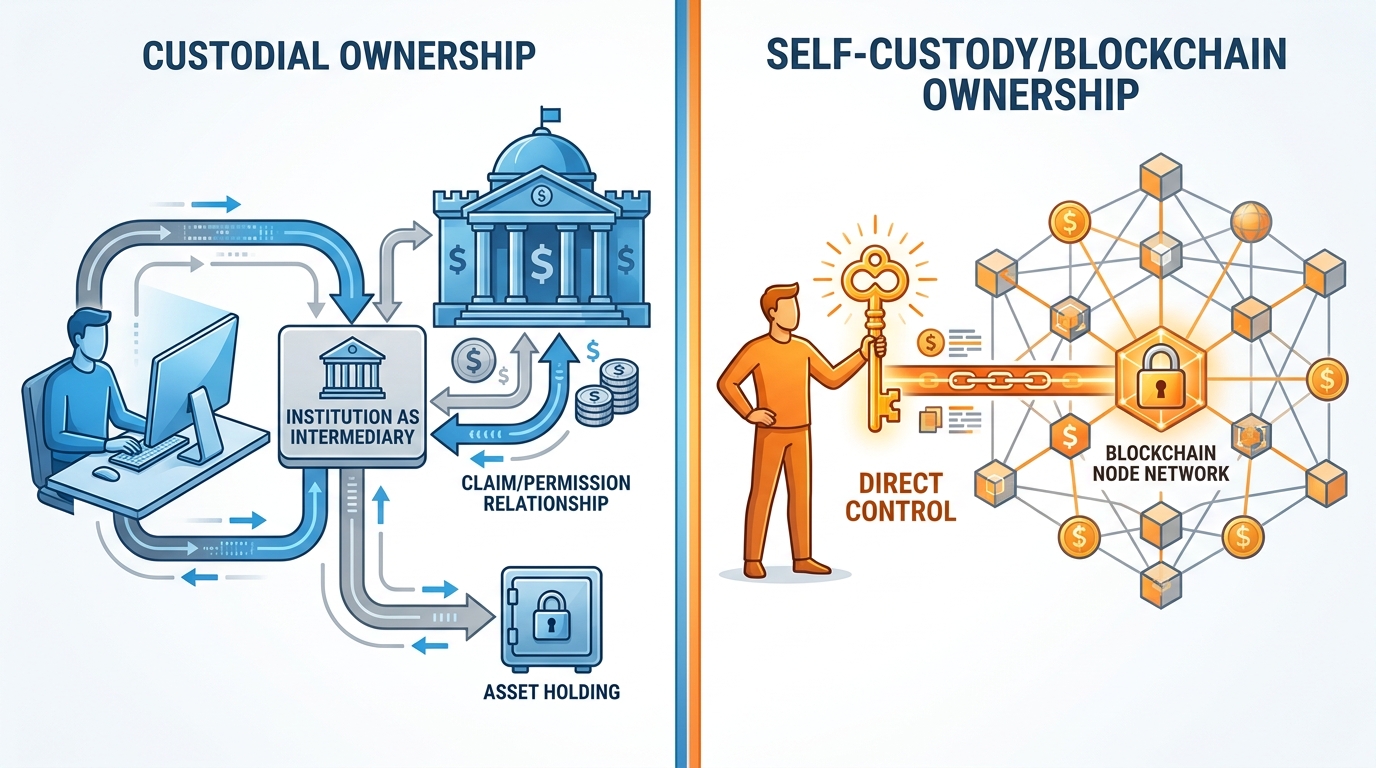
Figure 2:Two Models of Digital Ownership: Custodial ownership (left) means trusting an institution to honor your claim. Self-custody (right) means holding the cryptographic key that directly controls the asset — no intermediary required.
The trade-off is real and important, and we will explore it in detail. But let us first understand the mechanism.
1.2Public and Private Keys: The Mailbox Analogy
Every wallet in a blockchain system is built on a cryptographic key pair — a public key and a private key. Understanding the relationship between them is the single most important technical concept in this chapter.
Here is the most useful analogy: your public key is like a mailbox on a public street. Anyone can see it. Anyone can put something into it. Your address is publicly known, and there is nothing wrong with that — the openness is the point. Your private key is like the only key to the lock on that mailbox. Only someone with that key can open the mailbox and take out what is inside.
On a blockchain:
Your public key (or the address derived from it) is what you share with others so they can send assets to you. It is safe to publish it, post it online, put it on a business card.
Your private key is what you use to authorize outgoing transactions — to “sign” a message saying “I, the holder of this key, authorize the transfer of X amount of asset Y to address Z.” Anyone with your private key can do this. Which means anyone with your private key has full control of everything associated with it.
The mathematics behind this (elliptic curve cryptography) ensures that knowing the public key tells you nothing about the private key — even though the two are mathematically linked. You can derive a public key from a private key, but you cannot reverse the process. This is the one-way property we introduced with hashing in Chapter 0, applied to the ownership layer.
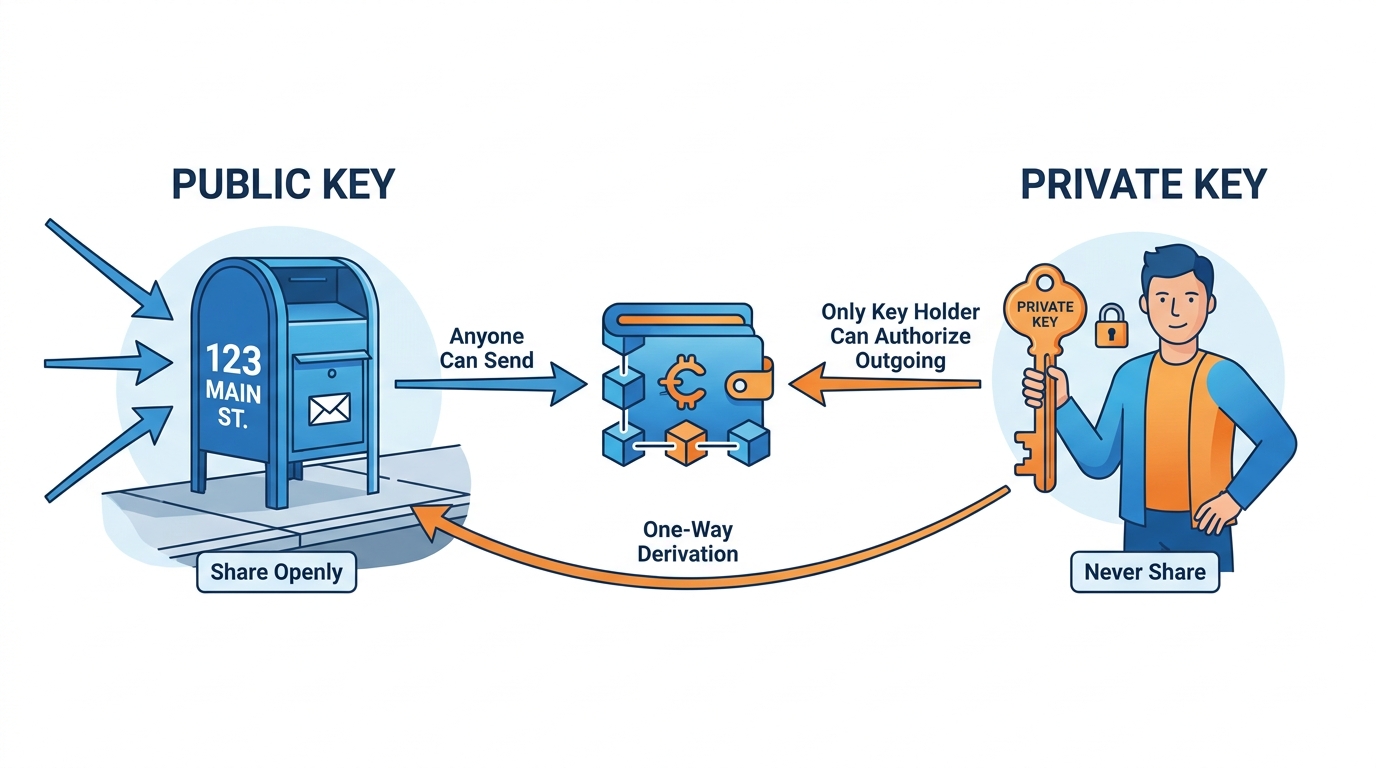
Figure 3:Public and Private Keys: The public key is your address — safe to share openly. The private key is your authorization mechanism — share it with no one, ever. Lose it, and the assets secured by it are gone permanently.
▶ Watch: Asymmetric Encryption — Simply Explained (4 min)
1.3What a Wallet Actually Is (And Isn’t)
The word “wallet” is one of the most persistent misnomers in the blockchain industry. A wallet does not hold your assets. Your assets live on the blockchain — they are entries in the distributed ledger, not files on your device. What a wallet holds — and what it manages — is your private key.
Think of a wallet as a key manager and a transaction interface:
Key Storage: It generates and securely stores your private key (usually never showing it to you directly — you see the seed phrase instead, which we will discuss momentarily).
Address Generation: It derives your public address from your private key and displays it so you can receive assets.
Transaction Signing: When you want to send an asset, the wallet uses your private key to cryptographically sign the transaction — proving that you, the key holder, authorized the transfer — without ever transmitting the private key itself.
Blockchain Interface: It queries the blockchain to show you your current balances and transaction history.
The wallet is a window into the blockchain and a signing mechanism. The assets are always on the chain. This distinction matters practically: if you lose your phone with your wallet app, you have not lost your assets. You have lost your key. If you have your seed phrase backed up (more on that shortly), you can restore your key on a new device and your assets will be there, untouched.
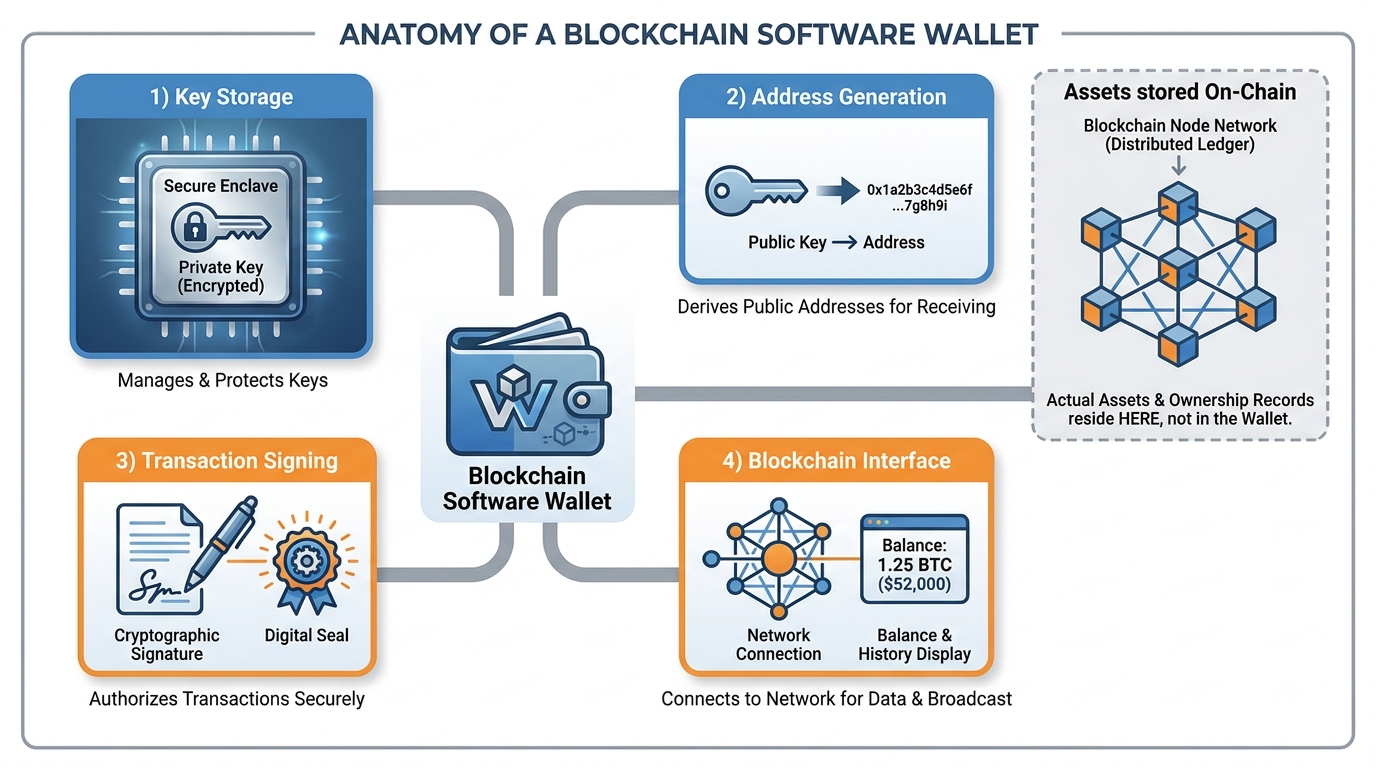
Figure 4:Wallet Anatomy: A wallet does not contain your assets — they live on the blockchain. The wallet is a key manager: it generates addresses, signs transactions, and serves as your interface to on-chain balances.
▶ Watch: How Bitcoin Wallets Work (Public & Private Key Explained) (4 min)
1.4The Seed Phrase: Twelve Words That Are Everything
When you create a new wallet, the software generates a random seed phrase — a sequence of 12 or 24 ordinary English words (from a standard list of 2,048 words) like:
chimney horizon bluebird vessel autumn flame quartz ocean marble temple drift signal
This phrase is a human-readable encoding of your master private key. From this seed phrase, the wallet software can deterministically derive your private key, your public key, and your addresses — every time, forever, on any compatible wallet software.
This means:
Your seed phrase IS your private key, in a form easier for humans to write down accurately
Anyone with your seed phrase has full control of all assets in that wallet — there is no recovery process, no institution to call, no dispute mechanism
If you lose your seed phrase AND lose access to your wallet device, your assets are permanently inaccessible. Not to you — not to anyone. Ever.
1.4.1How to Handle a Seed Phrase (Non-Negotiable Rules)
For this course, you will be working with a small amount of real value — approximately $20 of SOL. Here are the rules for handling your seed phrase:
Write it on paper. Not digitally. Not in a notes app. Not in a screenshot. Not in a cloud document. Paper.
Write it accurately. Every word, in exact order, spelled correctly.
Store it somewhere physically secure. Not next to your laptop. Not photographed on your phone.
Never, ever share it. Not with your professor. Not with a “support” representative. Not with anyone. Legitimate services never ask for your seed phrase.
Test it. After writing it down, verify you can read every word clearly. Seed phrases are case-insensitive but spelling-sensitive.
1.5Addresses: Your Public Identifier on Solana
On Solana, addresses are 32-44 character base-58 encoded strings derived from public keys. A Solana address looks like this:
7XJvSp3ETmq2zHkAFpMGbXNp9GwKL3DU4UqTLdJG2eBjThis address is public. Share it freely with anyone who needs to send you SOL or SPL tokens (Solana’s token standard). It is derived mathematically from your public key, which is derived from your private key. The derivation only works in one direction — from private to public to address — never in reverse.
Solana wallets can generate multiple addresses from a single seed phrase (using derivation paths). This is useful if you want to organize funds into separate wallets without managing multiple seed phrases. For this course, you will use two addresses: a primary wallet and a backup wallet.
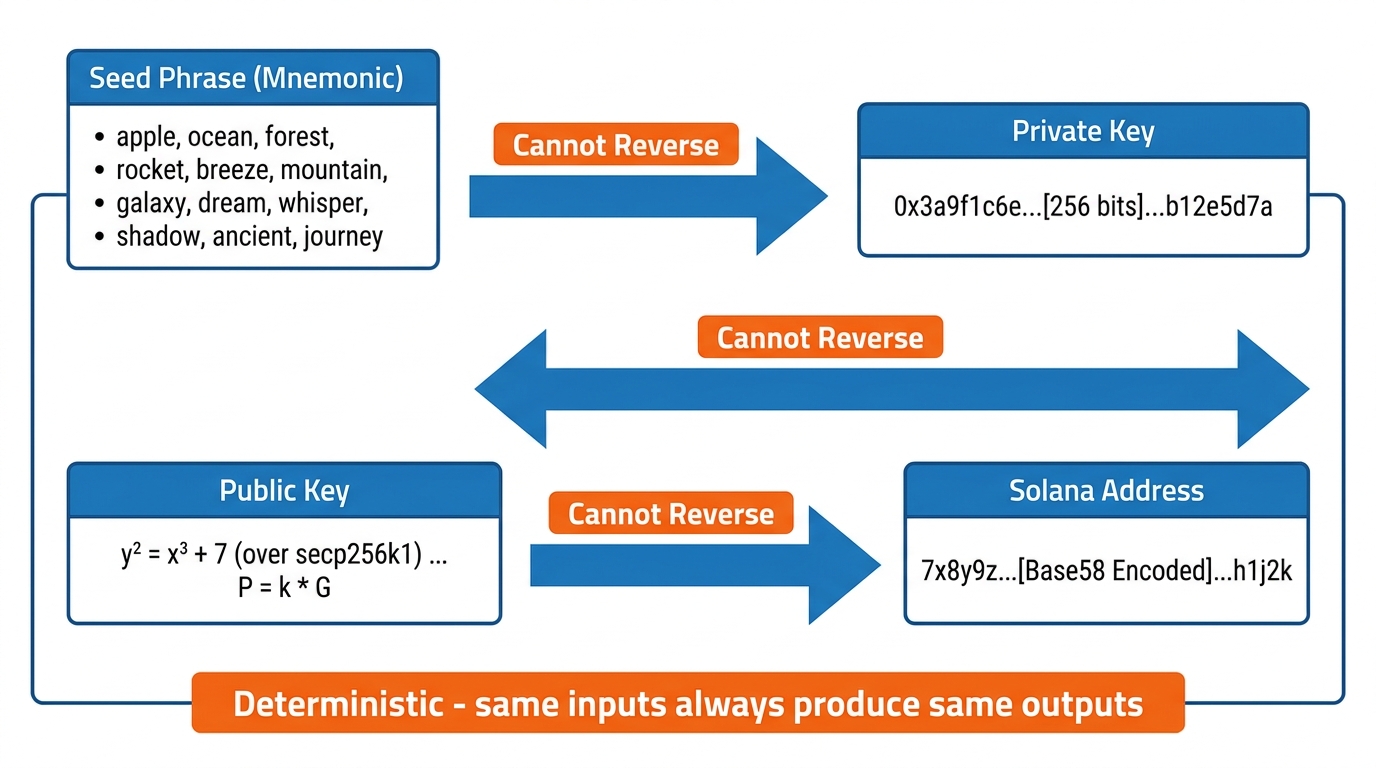
Figure 5:Address Derivation: One seed phrase generates one private key, which generates one public key, which generates a Solana address. The process is deterministic (same inputs always produce the same outputs) and one-directional (you cannot reverse any step).
1.6The Anatomy of a Solana Transaction
When you send SOL from one address to another, what actually happens? Let us walk through the technical anatomy of a Solana transaction — not as an abstraction, but as a sequence of real events you can observe on the block explorer.
Step 1: Instruction construction. Your wallet software assembles a transaction object. For a simple SOL transfer, this contains: the sender’s address, the recipient’s address, the amount in lamports (a lamport is 0.000000001 SOL — named after computer scientist Leslie Lamport), and any additional instructions (like token program calls for SPL token transfers).
Step 2: Fee estimation. Every Solana transaction requires a transaction fee, paid in SOL. Solana’s fees are among the lowest in the blockchain industry — typically 0.000005 SOL, or about $0.0005 at SOL ≈ $100 (the price assumption used for dollar figures throughout this book). This makes Solana economically viable for applications that would be cost-prohibitive on networks like Ethereum, where transaction fees can range from $5 to $200 depending on network congestion.
Step 3: Recent blockhash. The wallet fetches the hash of a recent block from the network. This hash is embedded in the transaction and serves two purposes: it proves the transaction was created recently (preventing replay attacks) and it links the transaction to the current state of the blockchain.
Step 4: Signing. Your wallet uses your private key to create a cryptographic signature over the entire transaction object. This signature mathematically proves that the holder of the private key corresponding to the sender’s address authorized this specific transaction. The signature is attached to the transaction.
Step 5: Broadcast. The signed transaction is broadcast to the Solana network — specifically to a validator node, which then propagates it to other validators.
Step 6: Consensus and confirmation. Solana validators process the transaction through their consensus mechanism (Tower BFT, which we will not detail here). Once a supermajority of validators have confirmed the transaction, it is finalized. On Solana, finality typically arrives within 400–800 milliseconds. This is not a rough estimate — it is a system architecture achievement that makes Solana categorically different from slower networks.
Step 7: Ledger update. The transaction is included in a block, which is added to the chain. The ledger state updates: the sender’s balance decreases, the recipient’s balance increases. Every node on the network now reflects the new state.
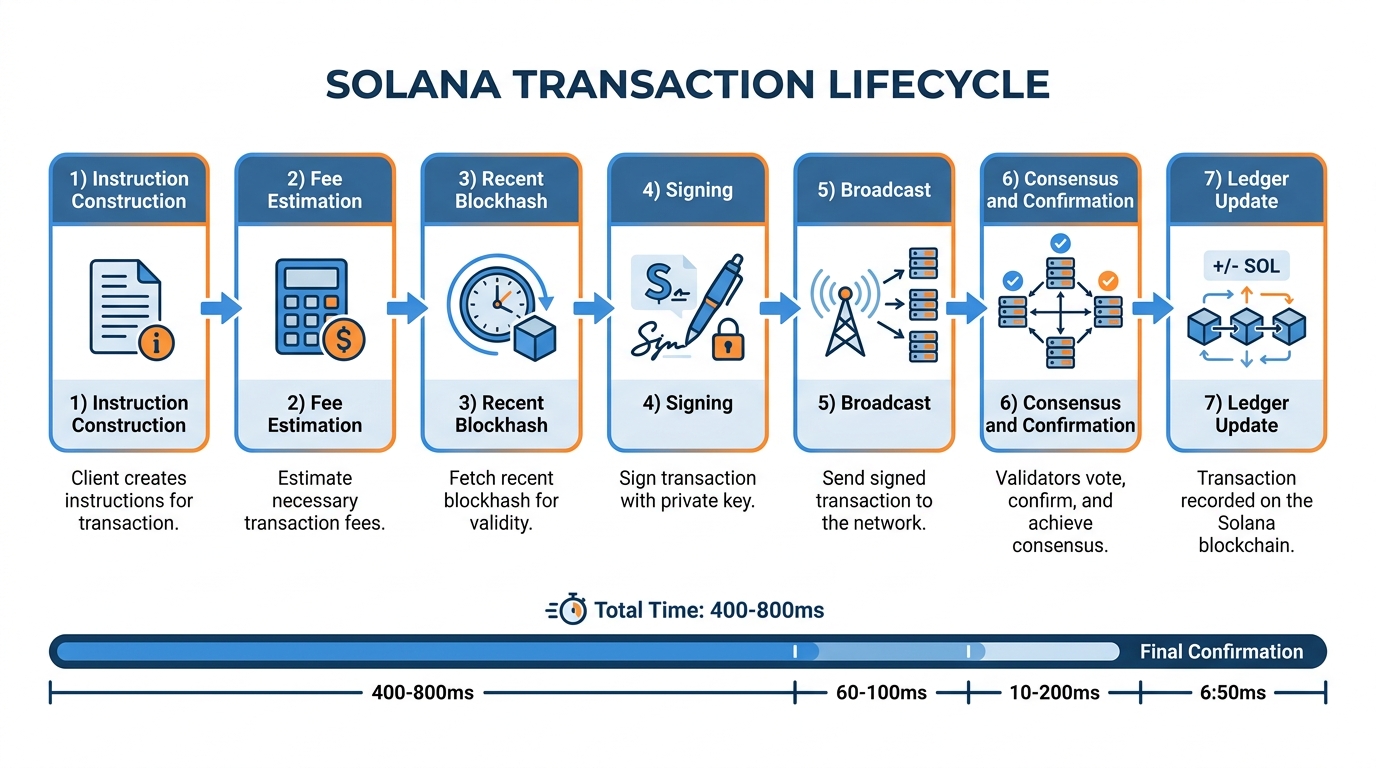
Figure 6:Solana Transaction Lifecycle: From the moment you click “Send” to finality on the ledger — seven steps, typically completed in under one second.
1.7Why Solana? The Economics and Architecture of Speed
The blockchain landscape in 2026 includes dozens of active Layer-1 networks and hundreds of Layer-2 solutions. Understanding why this course focuses on Solana requires a brief comparative analysis.
1.7.1The Ethereum Challenge
Ethereum is the most widely used programmable blockchain, with the largest developer ecosystem and the longest track record. It introduced smart contracts, DeFi, and NFTs to the mainstream. For these reasons, it deserves respect.
But Ethereum has two characteristics that make it impractical for many real-world business applications:
Cost: Ethereum’s gas fees — the cost of executing transactions and smart contract operations — are priced in ETH and fluctuate based on network congestion. During periods of high activity, simple token transfers have cost $50–$200 per transaction. For a business trying to serve customers with sub-$10 transaction values, this is a fundamental economic barrier.
Speed: Ethereum’s base layer processes approximately 15–30 transactions per second, with finality taking 12–15 minutes. (Ethereum’s Layer-2 solutions improve this significantly, but add complexity for developers and users.) In fairness, Ethereum’s Layer-2 networks (Base, Arbitrum) are the realistic 2026 comparison on fees and speed, and on those metrics they are competitive with Solana. The book’s argument for Solana rests on a single integrated execution layer — one chain, one fee market, one state — with no bridging between L1 and L2 for users or developers to manage. For applications requiring real-time settlement — point-of-sale, gaming, supply chain tracking — this latency is prohibitive.
1.7.2The Solana Architecture
Solana was designed from the ground up to solve these problems. Its key architectural innovations:
Proof of History (PoH): Solana’s most novel contribution is a cryptographic clock — a verifiable delay function that creates a historical record proving that events occurred at a specific point in time. This allows validators to process transactions in parallel without needing to communicate with each other to establish ordering, which is the key bottleneck in traditional blockchain architectures.
Tower BFT: Solana’s consensus mechanism builds on PBFT (Practical Byzantine Fault Tolerance) to leverage the PoH clock. Validators can vote on proposed blocks much faster because the ordering is pre-established.
Gulf Stream: Solana’s mempool-less transaction forwarding protocol. Rather than holding pending transactions in a pool, transactions are forwarded to the next expected validator before the current block is even finalized, reducing confirmation times.
Turbine: Solana’s block propagation protocol, inspired by BitTorrent, that breaks blocks into small packets for efficient transmission across the network even as block sizes grow.
The result of these architectural choices:
| Metric | Bitcoin | Ethereum | Solana |
|---|---|---|---|
| Throughput (TPS) | 7 | 15-30 | 65,000 (theoretical ceiling; sustained real-world throughput is in the low thousands) |
| Block time | ~10 min | ~12 sec | ~400 ms |
| Avg. transaction fee | ~$1-5 | ~$1-50 | ~$0.0005 |
| Finality | ~60 min | ~12-15 min | ~400-800 ms |
| Energy per tx | ~700 kWh | ~0.03 kWh | <0.001 kWh |
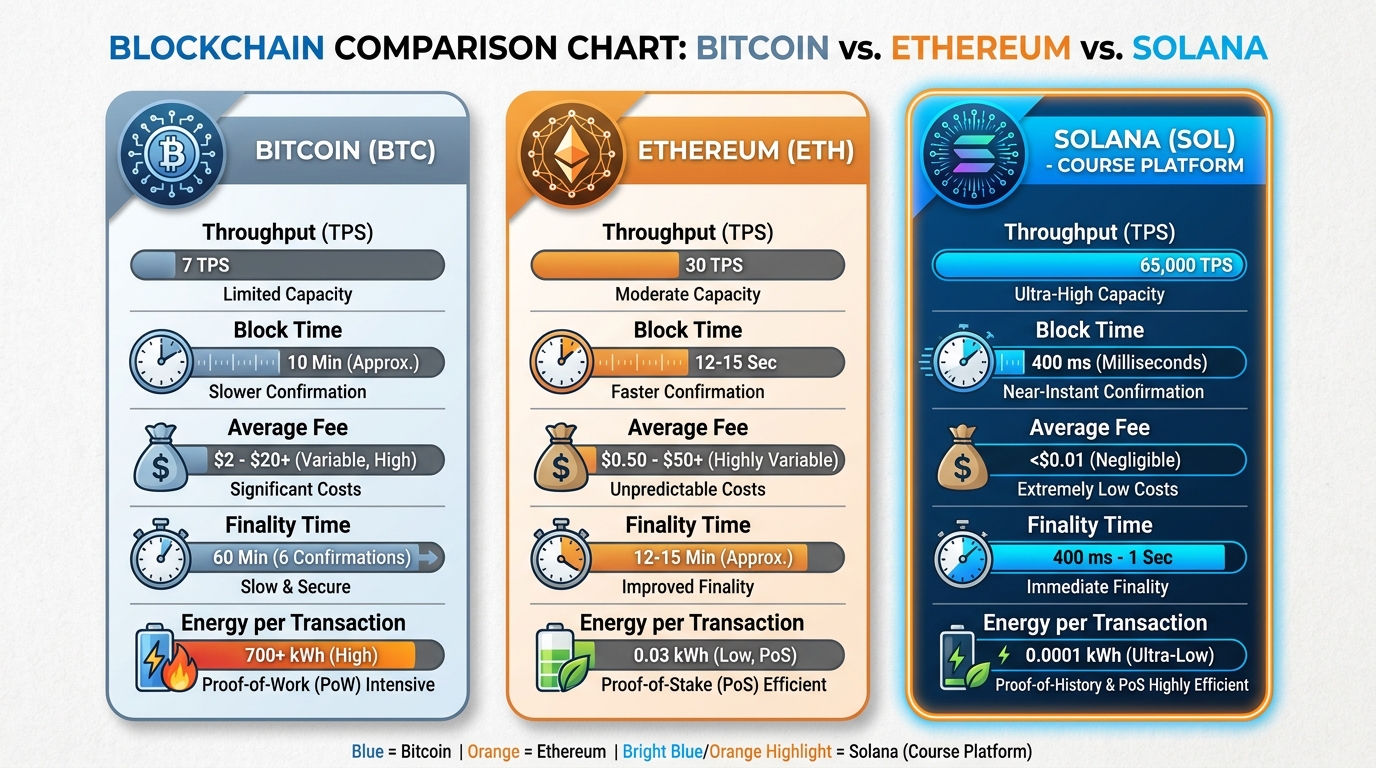
Figure 7:Blockchain Performance Comparison: Solana’s architectural innovations — Proof of History, Tower BFT, Gulf Stream, and Turbine — produce performance characteristics that make it economically viable for a much wider range of business applications.
1.7.3Solana’s Trade-offs
No architecture is without trade-offs. Solana’s speed and low fees come with costs:
Centralization pressure: Running a Solana validator requires substantial hardware (128GB RAM, multiple high-performance NVMe drives, a 12-core CPU minimum). This creates economic barriers that tend toward a smaller, more capital-intensive validator set compared to networks with lower hardware requirements.
Outage history: Solana has experienced several network-wide outages (most notably in September 2021, January 2022, and May 2022) — instances where the network halted and required validators to coordinate a restart. These events, while resolved, highlight that Solana’s design makes different trade-offs than older, more conservative networks.
Ecosystem maturity: Solana’s developer tooling, documentation, and ecosystem are mature but younger than Ethereum’s. Some developer resources remain less polished than their Ethereum equivalents.
For the purposes of this course — building real token economies with real business models — Solana’s speed, low fees, and rich ecosystem of DeFi protocols, DEXes, and developer tools make it the most practical choice. The $20 of SOL you are about to acquire will last you the entire course; the same budget on Ethereum would be consumed by fees in a single session.
1.8Reading a Block Explorer: Your Window Into the Chain
A block explorer is a website that lets you read the blockchain — every block, every transaction, every address balance — in a human-readable format. It is the equivalent of reading the village notebook. Everything is public, searchable, and verifiable.
For Solana, the primary block explorer is Solscan (solscan.io). The Solana Foundation also provides its own explorer at explorer.solana.com.
When you execute your first transaction in the Activity section, you will look up your transaction on Solscan and annotate what you see. Let us preview what a transaction page shows:
Transaction Signature: A 87-88 character base-58 string that uniquely identifies the transaction. This is the transaction’s hash — its cryptographic fingerprint. If you share this with anyone, they can look up the complete transaction history.
Status: Confirmed ✓ (or Failed ✗). Unlike a bank transfer that might “process for 3-5 business days,” a Solana transaction either succeeds or fails within seconds — and you can see the result immediately.
Block: Which block number contains this transaction. The block also shows the timestamp — the exact moment (to the millisecond) when the transaction was finalized.
From and To: The sending and receiving addresses. Because addresses are pseudonymous (not explicitly linked to real-world identities), these addresses might be yours, might be an exchange’s, might be a smart contract. But the addresses are permanent and public.
Amount: How many lamports (and their SOL equivalent) were transferred.
Fee: The transaction fee paid to validators. For SOL transfers, typically 5,000 lamports (0.000005 SOL).
Program: Which Solana program (smart contract) processed the transaction. For simple SOL transfers, this is the System Program. For token transfers, it is the SPL Token Program.
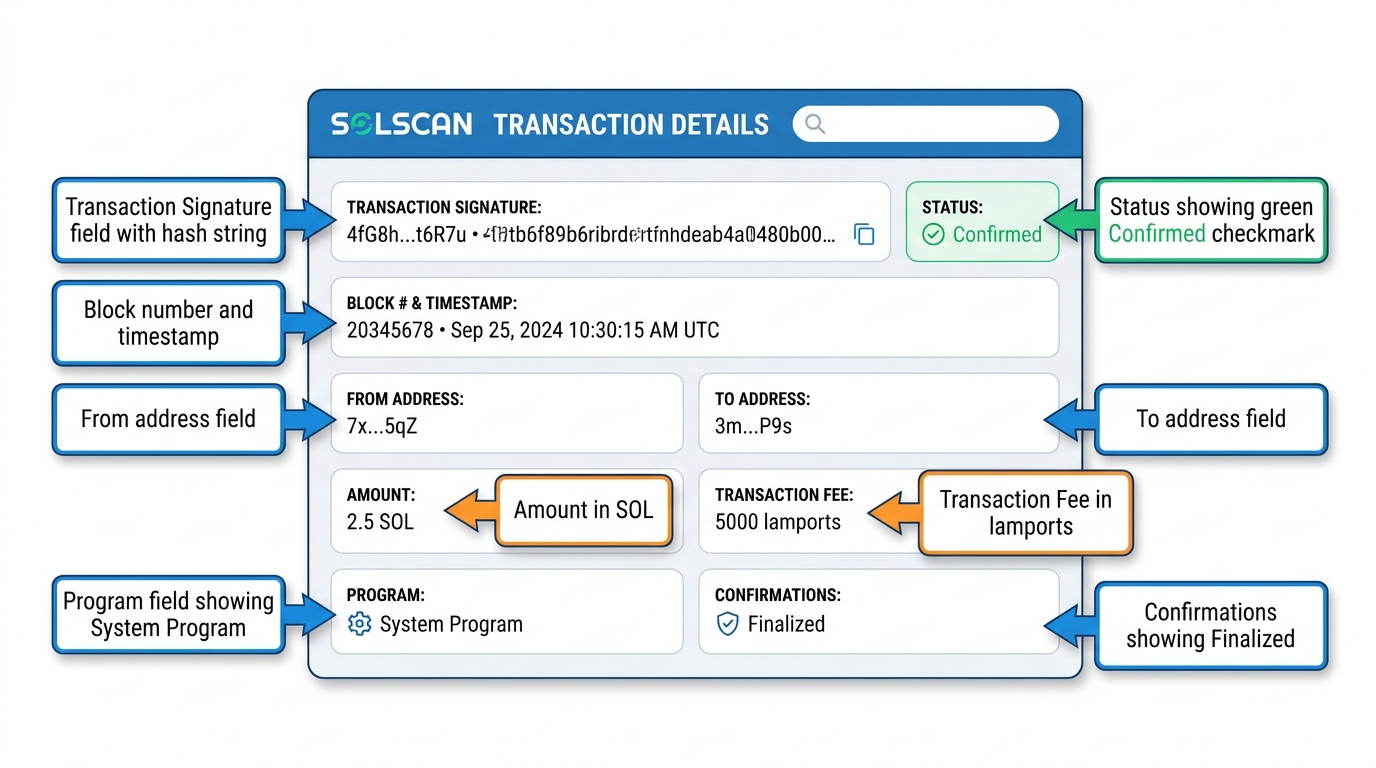
Figure 8:Solscan Transaction Anatomy: Every transaction on Solana is public and permanently recorded. The block explorer is your audit trail — show this to any counterparty to prove a payment was made.
1.9Custody Models: Self-Custody vs. Custodial Wallets
Before you proceed to the Activity, it is important to understand that the self-custody model you are about to practice is not the only model — and for many use cases, it is not the right model.
1.9.1Self-Custody (Non-Custodial)
In the self-custody model, you hold your private key. No institution has access. The upside is absolute ownership. The downside is absolute responsibility. If you lose your seed phrase, your assets are permanently inaccessible. If someone steals your seed phrase, your assets are permanently lost. There is no customer support, no dispute resolution, no recovery.
Self-custody is appropriate for:
Technically sophisticated users who understand the risks
Holdings large enough to justify hardware wallet investment (more on hardware wallets in a moment)
Use cases where censorship resistance is a core requirement (activists in authoritarian regimes, for example)
Development and testing
1.9.2Custodial Wallets
In the custodial model, a third party (a crypto exchange like Coinbase, Kraken, or Binance) holds your private key on your behalf. You log into their platform with a username and password. They maintain the key and execute transactions on your instruction.
The upside is familiarity and recovery options — you can reset a forgotten password. The downside is that you are back in the traditional ownership model: you own a claim against the custodian, not the assets themselves. Exchanges can be hacked (Mt. Gox, 2014: $460 million lost; FTX, 2022: $8 billion customer funds lost in bankruptcy). Exchanges can freeze accounts. Exchanges can fail.
The industry wisdom, which has become a cultural maxim: “Not your keys, not your coins.”
1.9.3Hardware Wallets
For serious asset holdings, self-custody users typically use a hardware wallet — a physical device (Ledger, Trezor) that stores the private key in a secure enclave, never exposing it to internet-connected devices. When signing a transaction, you physically confirm on the device. The private key never leaves the hardware. This is the gold standard for self-custody security, and the recommended approach for holdings above ~$1,000.
1.9.4Embedded Wallets
A fourth model has become standard in consumer applications: the embedded wallet — a wallet created and managed inside an app by a wallet-as-a-service provider (Privy, Dynamic, and the embedded SDKs offered by major wallet vendors). The user signs up with an email address or a passkey, and a wallet is generated for them behind the scenes; they never see a seed phrase, never install an extension, and often never know they are using a blockchain at all. Key material is typically split or held in secure enclaves managed by the service, and recovery works the way users expect — through the login they already have.
The trade-off is the theme of this chapter in miniature: convenience and recoverability come at the cost of the app provider becoming a quasi-custodian, since the user’s access to the key depends on the provider’s infrastructure and policies. For a business onboarding mainstream customers, that trade is often the right one — Chapter 7’s discussion of user experience returns to why the connect-wallet step is where most customers are lost.
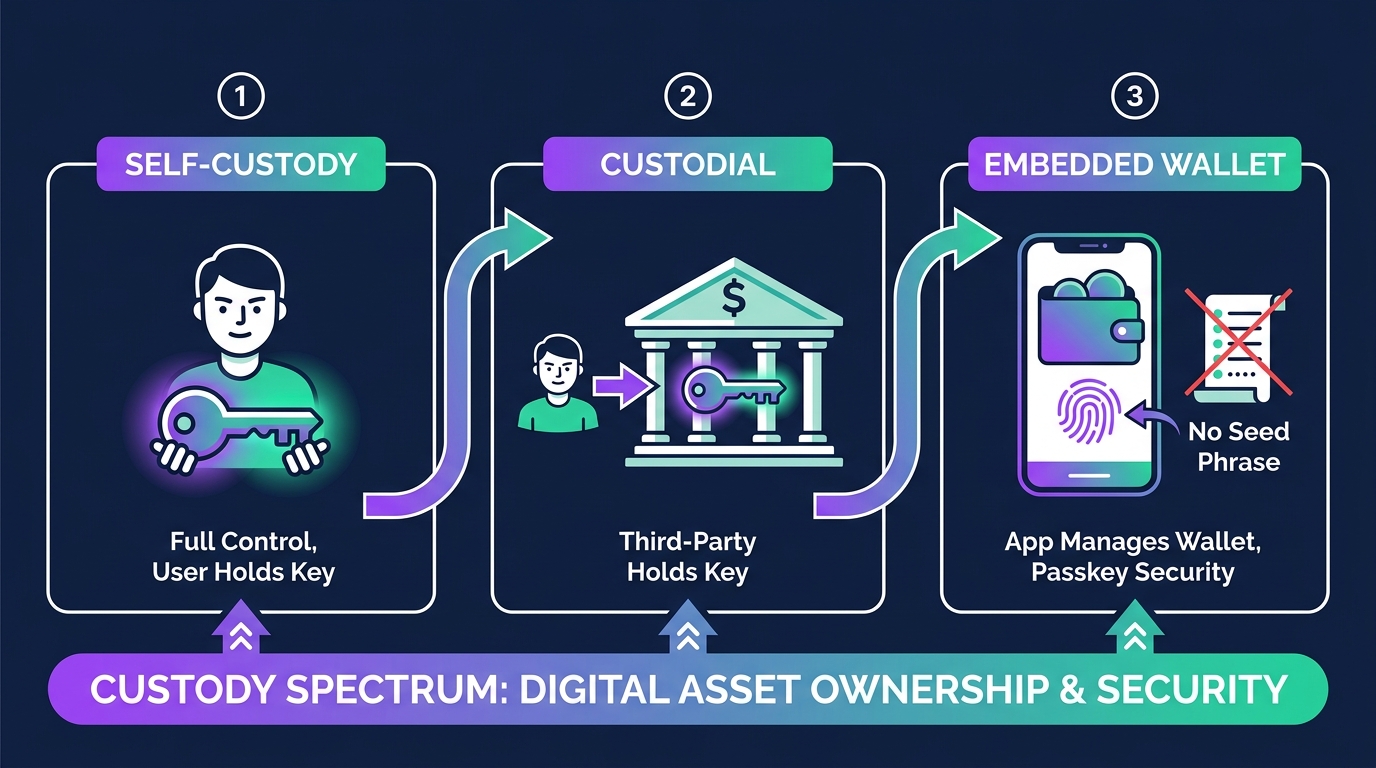
Figure 9:Embedded Wallets: The user logs in with a passkey or email and never sees a seed phrase — the app’s wallet-as-a-service provider manages the key. Convenience and recoverability, in exchange for the provider becoming a quasi-custodian.
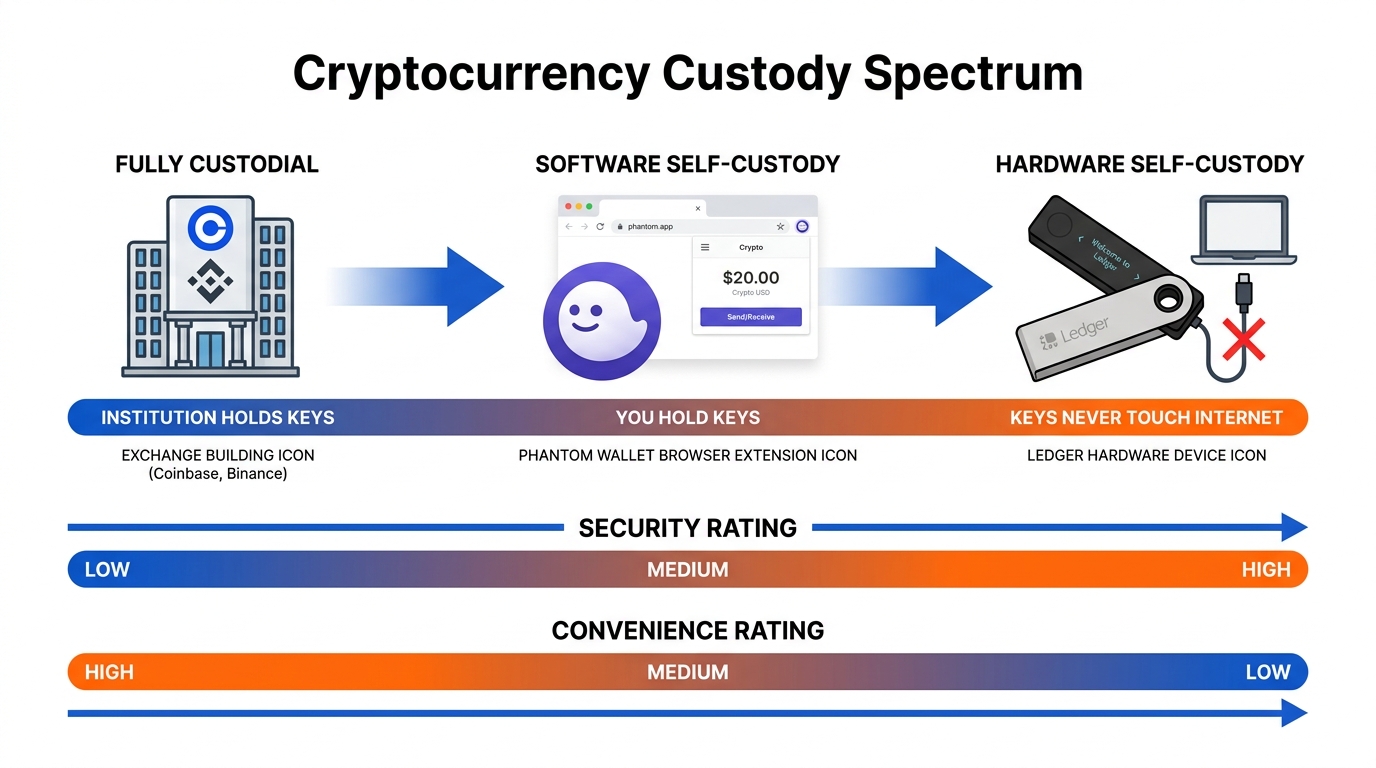
Figure 10:The Custody Spectrum: Security and convenience trade off directly. For this course, a software wallet (Phantom) with proper seed phrase security is appropriate for the small amounts involved.
Stablecoins such as USDC add a second custody question — the issuer’s — covered in Chapter 5, Beyond the Pool.
1.10Phantom: Solana’s Primary Wallet
Phantom (phantom.app) is the most widely used Solana wallet, available as a browser extension (Chrome, Firefox, Edge, Brave) and as a mobile app (iOS, Android). It is free, non-custodial, and integrates with virtually every Solana DeFi protocol, DEX, and NFT marketplace you will encounter in this course.
Phantom launched in 2021 and has grown to more than 15 million monthly active users. It has been audited by multiple security firms, is maintained by a well-funded company, and has a track record of responsible security disclosures. For a software wallet used with small amounts and as a learning tool, it is the appropriate choice for this course.
1.11🎯 Activity: Your First Solana Transaction
This activity has five steps. Set aside 20-30 minutes with your phone and computer. You will need approximately $25 in US dollars to complete it (which you will retain as SOL and a learning asset).
1.11.1Step 1: Create Your Primary Wallet (5 minutes)
Go to phantom.app on your desktop browser
Click “Download” and install the browser extension for your browser
Open the extension and click “Create a new wallet”
Phantom will display your 12-word seed phrase. STOP HERE.
Get a piece of paper and a pen
Write down every word, in order, accurately
Double-check your spelling against what Phantom shows
Store this paper somewhere physically secure — NOT at your desk
Confirm the seed phrase by selecting the words in order when prompted
Set a wallet password (this protects the extension on your device — it is NOT your seed phrase)
Note your wallet address (copy it and paste it somewhere you can reference)
Your primary wallet is ready.
1.11.2Step 2: Create Your Backup Wallet (3 minutes)
You will send SOL from your primary wallet to this backup wallet. Having two wallets reinforces the mechanics.
In Phantom, click your account icon (top center of the extension)
Click “Add / Connect Wallet”
Select “Create new wallet”
Write down this second seed phrase on a different piece of paper
Note the backup wallet’s address
1.11.3Step 3: Acquire SOL (5-10 minutes)
The easiest path for US-based students:
Option A: Buy directly in Phantom (US debit/credit card)
In Phantom, click “Buy”
Select “Solana (SOL)”
Purchase approximately $25 worth of SOL
Phantom routes through MoonPay or Coinbase Pay — you will need to complete a brief identity verification
SOL typically arrives within 5–15 minutes
Option B: Via Coinbase
Create or log into your Coinbase account (coinbase.com)
Buy $25 of SOL
Send it to your Phantom primary wallet address
Note: Coinbase sends SOL on the Solana network; confirm “Solana” network is selected before withdrawing
Option C: Via a peer (if a classmate already has SOL)
Give them your primary wallet address
Have them send you 0.1 SOL
Verify receipt on Solscan
Wait until your SOL has arrived in your primary wallet and is visible in Phantom before proceeding.
1.11.4Step 4: Send SOL Between Your Wallets (3 minutes)
In Phantom (showing your primary wallet), click “Send”
Paste your backup wallet address in the recipient field
Enter an amount: 0.01 SOL (approximately $1 at SOL ≈ $100 — a trivial amount that will demonstrate the mechanics)
Review the transaction details — note the fee shown (should be <$0.01)
Click “Send”
Phantom will show a confirmation screen — click “Confirm”
Watch the transaction status. It should change from “Processing” to “Confirmed” within 1-2 seconds
1.11.5Step 5: Find Your Transaction on Solscan (5 minutes)
Open Solscan.io in your browser
In the search bar, paste your primary wallet address
You will see your account page showing your SOL balance, token holdings, and transaction history
Click on the most recent transaction (the 0.01 SOL transfer you just made)
On the transaction page, take a screenshot
Annotate the screenshot (you can use Preview, Paint, or any annotation tool) to label:
The transaction signature
The “From” address (your primary wallet)
The “To” address (your backup wallet)
The amount transferred
The transaction fee
The block number and timestamp
The “Confirmations” field (should say “Finalized”)
Save this annotated screenshot. It is your deliverable for this chapter.
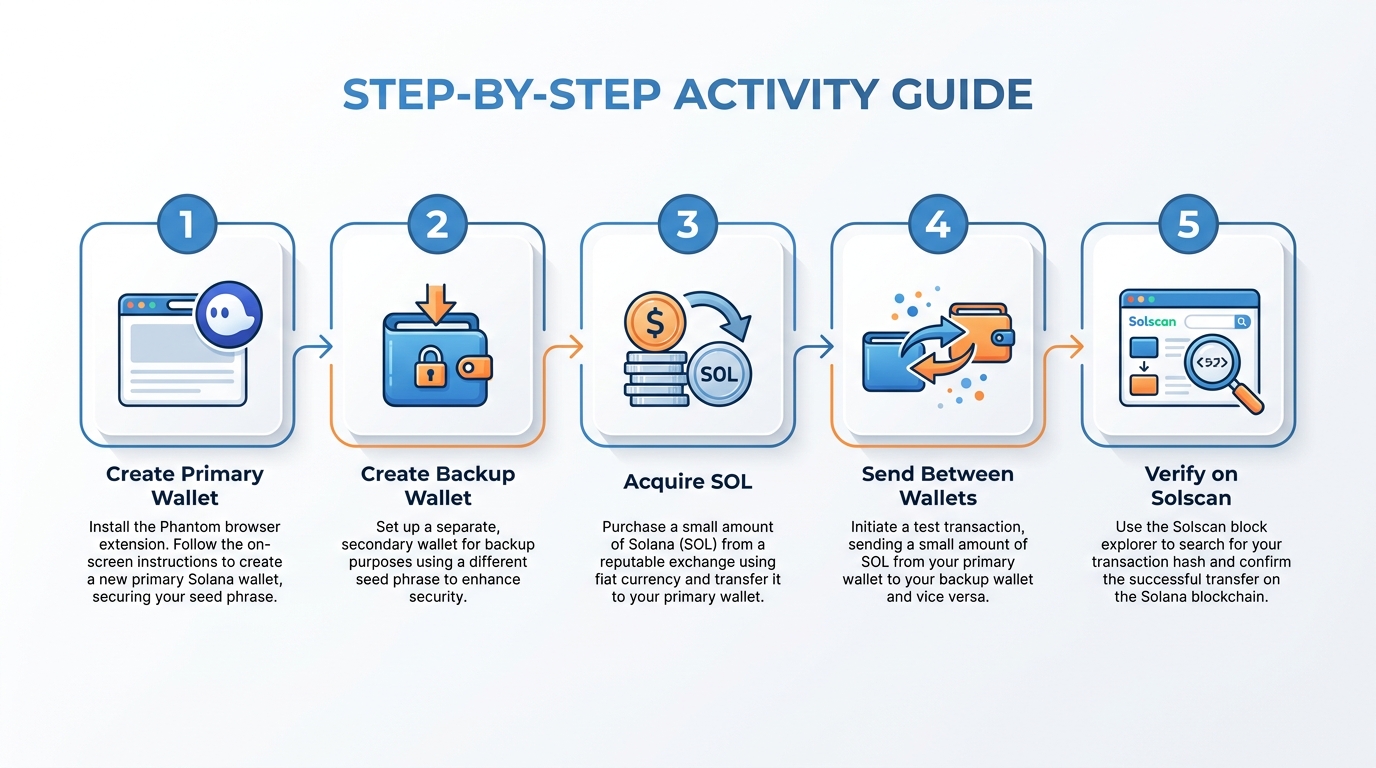
Figure 11:Activity Workflow: Five steps from wallet creation to verified on-chain transaction. Each step builds on the previous, giving you direct experience with the full self-custody workflow.
1.12Advanced: Reading Your Full Account on Solscan
Once you have completed the basic activity, take an additional 5 minutes to explore what Solscan shows about your wallet:
Portfolio tab: Shows all tokens in your wallet, not just SOL. Right now this is just SOL, but by Chapter 3, this will include your own token.
Transactions tab: Your complete transaction history — every send, receive, and program interaction, with timestamps and signatures. This is your permanent, public, irrevocable record. Note that transactions cannot be deleted. They cannot be redacted. Whatever you put on the blockchain is there forever.
DeFi Activities tab: Once you start interacting with DeFi protocols in Chapter 5, this tab will show liquidity positions, staking rewards, and swap histories.
NFT tab: Your NFT holdings — relevant for Chapter 9.
Take a moment to appreciate what you are looking at: a complete, publicly auditable record of every economic action associated with this address, available to anyone in the world, with no institution in the middle. This is what radical transparency looks like. It is both powerful and, in some contexts, concerning — which is part of why the discussion question at the end of this chapter matters.
1.13The Bigger Picture: What Changes When Ownership Is a Key
We opened this chapter with the observation that you do not own the money in your bank account — you hold a claim. Let us return to that observation now, with the mechanics of self-custody fully in hand, and examine what actually changes.
For individuals in stable, regulated economies: The practical difference between custodial bank ownership and blockchain self-custody is primarily philosophical for most everyday transactions. Your FDIC-insured bank deposits are, for practical purposes, safe. The inconveniences (transfer times, fees, account restrictions) are real but manageable. Self-custody adds responsibility and risk; the sovereignty it provides is valuable to some users and unimportant to others.
For individuals in unstable or authoritarian economies: The difference is concrete and urgent. When inflation erodes a currency by 50% per year (as in Venezuela and Argentina in recent years), holding savings in a dollar-pegged stable coin on Solana is a genuine hedge against monetary policy failure. When a government freezes political dissidents’ bank accounts (as Canada briefly did with trucker protest supporters in 2022, and as authoritarian regimes do routinely), self-custody becomes the only form of economic autonomy available. These are not edge cases. They are the lived experience of hundreds of millions of people.
For businesses: Self-custody in a business context introduces questions of governance and liability. If the private key is held by one employee and that employee leaves, is killed in an accident, or is coerced, the company’s assets could be permanently inaccessible or stolen. Business blockchain deployments typically use multi-signature (multisig) wallets — where transactions require M of N keyholders to sign (for example, 3 of 5 partners must approve). We will design a multisig treasury in Chapter 11.
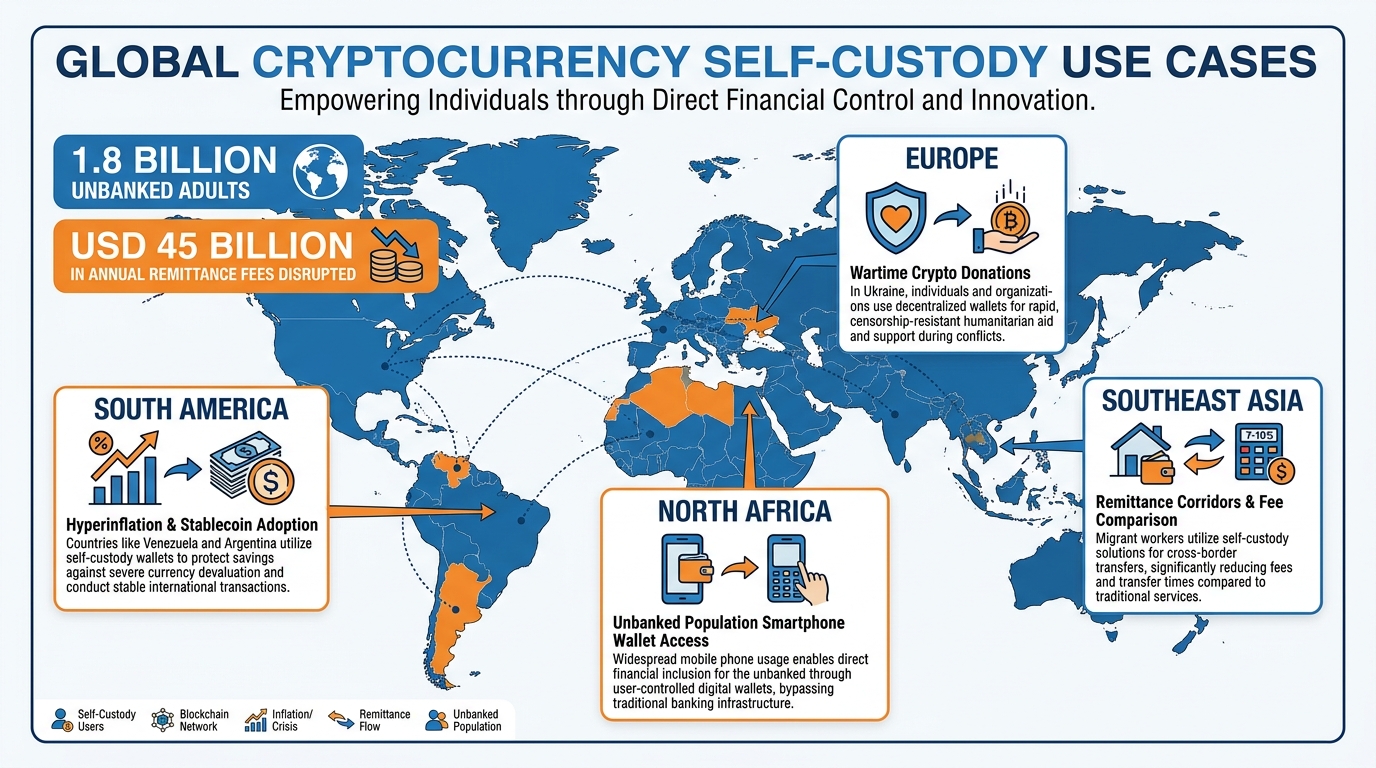
Figure 12:Self-Custody in the Real World: Blockchain self-custody is not just a technical preference — for hundreds of millions of people in economies with monetary instability or authoritarian restrictions, it is a meaningful form of financial sovereignty.
1.14The Revolution You Just Participated In
You have just done something that was technically impossible for most of human history, and impossible for most adults even 15 years ago: you have established unmediated digital ownership.
The private keys sitting in your Phantom wallet — secured by the seed phrases on your two pieces of paper — represent a form of ownership that does not require anyone’s permission, does not depend on any institution’s solvency, and cannot be frozen, restricted, or confiscated without your cooperation. This is not a minor feature. It is a categorical change in the nature of digital property.
The global addressable market for financial services that blockchains can disrupt runs into the trillions of dollars annually. The remittance market alone — international money transfers by migrant workers back to their home countries — generates $45 billion in fees per year. A Solana transaction that accomplishes the same transfer in 400 milliseconds for $0.0005 in fees does not disrupt that market incrementally. It makes the existing fee structure indefensible.
Cross-border business payments — currently routed through Swift with 2-5 day settlement and fees of 2-4% — are experiencing the same compression. Payments companies like Circle (issuer of the USDC stablecoin) and Stripe have integrated Solana-based settlement precisely because the economics are too compelling to ignore at scale.
The 20 minutes you spent in this chapter’s activity are the foundation for understanding all of it.
1.15🚀 Walk Away With
✅ Primary Phantom wallet with seed phrase secured on paper
✅ Backup Phantom wallet with seed phrase secured on separate paper
✅ Funded primary wallet (approximately $20 of SOL)
✅ Annotated transaction screenshot from Solscan, showing all transaction fields labeled
✅ Conceptual understanding of the difference between custodial and non-custodial ownership, with the ability to explain it using the mailbox analogy
Bring your annotated Solscan screenshot to the next class. We will use your wallet addresses in Chapter 2 when we design the first version of your token.
1.16💬 Discussion Question
1.17Glossary
Private Key A randomly generated 256-bit secret number that authorizes transactions from a blockchain address. Whoever holds the private key controls all assets at the corresponding address. Must never be shared.
Public Key Derived mathematically from a private key, used to generate a blockchain address and verify digital signatures. Safe to share publicly.
Seed Phrase A human-readable encoding of a private key — typically 12 or 24 ordinary English words. Can be used to restore a wallet on any compatible software. Equivalent in security sensitivity to the private key itself.
Wallet Software (or hardware) that stores private keys, generates addresses, and interfaces with the blockchain to sign transactions and display balances. Does not “hold” assets — those live on the blockchain.
Phantom The primary non-custodial browser extension and mobile wallet for Solana. Free and compatible with virtually all Solana DeFi and NFT protocols.
Address A public identifier on the blockchain, derived from the public key. Used to receive assets. On Solana, typically 32-44 characters in base-58 encoding.
Lamport The smallest unit of SOL — 0.000000001 SOL. Named after computer scientist Leslie Lamport. Transaction fees on Solana are typically 5,000 lamports (0.000005 SOL).
Self-Custody The practice of holding your own private keys without relying on a third-party custodian. Provides full asset sovereignty; requires personal responsibility for key security.
Custodial Wallet A wallet in which a third party (such as an exchange) holds the private keys on your behalf. Offers recovery options but reintroduces institutional trust requirements.
Hardware Wallet A physical device that stores private keys in a secure enclave, never exposing them to internet-connected computers. Examples include Ledger and Trezor. Recommended for significant asset holdings.
Multisig (Multi-Signature) A wallet configuration requiring M of N private keys to authorize a transaction (e.g., 3 of 5). Reduces single-point-of-failure risk for businesses and DAOs.
Embedded Wallet A wallet created and managed inside an application by a wallet-as-a-service provider (e.g., Privy, Dynamic). The user signs in with an email or passkey and never sees a seed phrase; the trade-off is that the app provider becomes a quasi-custodian of the key.
Non-Custodial A wallet or protocol in which the user holds their own private keys — no third party has custody or control of the assets.
Block Explorer A website providing public read access to blockchain data — blocks, transactions, addresses, and token balances. Solscan.io is the primary Solana block explorer.
Solscan The primary block explorer for Solana (solscan.io). Displays all account balances, transaction history, token holdings, DeFi positions, and NFT holdings for any Solana address.
Transaction Signature The cryptographic hash uniquely identifying a specific transaction on the blockchain. Can be used to look up any transaction permanently on a block explorer.
Finality The state at which a blockchain transaction is irreversible — confirmed by enough of the network that reversal would require an overwhelming majority of validator collusion. On Solana, finality arrives in approximately 400-800 milliseconds.
SPL Token The Solana Program Library token standard — the equivalent of Ethereum’s ERC-20. All fungible tokens on Solana (including stablecoins like USDC) are SPL tokens. We will create one in Chapter 3.
Proof of History (PoH) Solana’s cryptographic clock — a verifiable delay function that establishes a historical record of events before they are confirmed by consensus, enabling Solana’s high throughput.
Gas Fee The fee paid on Ethereum for transaction execution, priced in Gwei (a fraction of ETH). Variable and can be extremely high during network congestion. Contrast with Solana’s fixed, extremely low fees.
KYC (Know Your Customer) Identity verification requirements imposed on financial service providers by regulators, requiring them to confirm the identity of their customers. Applies to custodial crypto services under most jurisdictions’ regulations.
MiCA (Markets in Crypto-Assets) The European Union’s comprehensive regulatory framework for cryptocurrency, effective 2024-2025. Imposes licensing, disclosure, and conduct requirements on crypto service providers operating in the EU.